


I’ve been testing AI marketing tools since the GPT-3 API was in beta back in 2021, and here’s something that might surprise you: the “best” AI marketing tool is rarely the one with the flashiest demos or biggest marketing budget. Over the past four years, I’ve personally tested over 150 AI-powered marketing platforms—some brilliant, some absolute money pits—and I’ve learned that the right tool depends entirely on what you’re actually trying to accomplish.
Last month, a client asked me which AI tool they should invest in for their content marketing. They were ready to drop $500/month on whatever I recommended. Instead of giving them a simple answer, I walked them through my testing framework—because here’s the reality: choosing the wrong AI marketing tool can waste thousands of dollars and months of productivity. I’ve made those expensive mistakes so you don’t have to.
In this guide, I’m sharing honest, hands-on reviews of the top AI marketing tools I actually use and recommend in 2025. No affiliate fluff, no regurgitated feature lists—just practical insights from someone who’s implemented these tools across dozens of real marketing campaigns.
What Makes an AI Marketing Tool Actually Worth Your Money
Before we dive into specific tools, let me share what I’ve learned after burning through about $5K on tools that looked amazing in demos but failed spectacularly in real-world use.
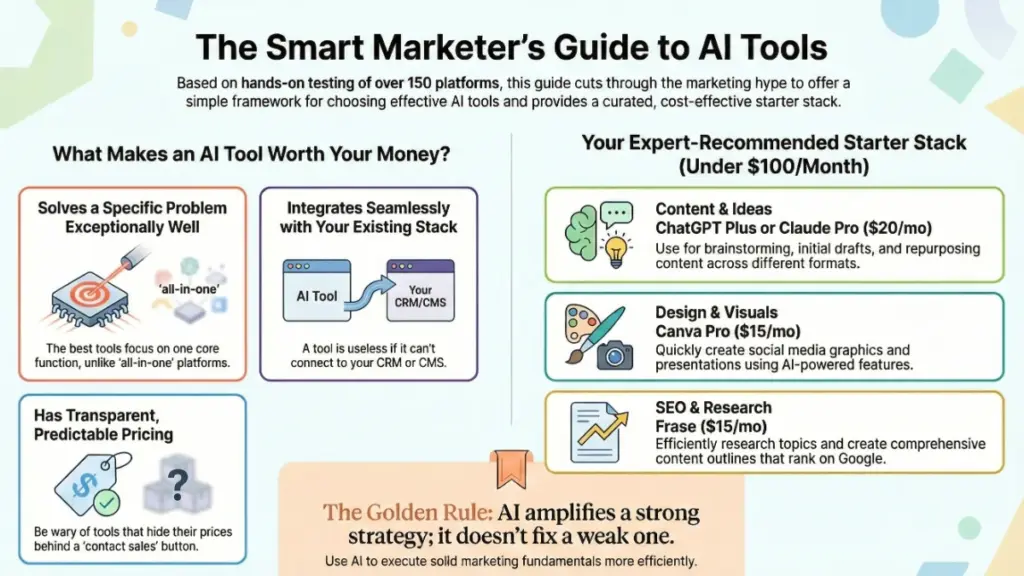
The best AI marketing tools share three critical characteristics that separate them from the hundreds of mediocre options flooding the market:
They solve a specific problem exceptionally well. I’ve noticed that tools trying to do everything—content writing, social media, email, analytics, and design—usually do nothing particularly well. The tools I consistently recommend excel at one or two core functions. For instance, I use Jasper primarily for long-form content and Copy.ai for short-form social media, not interchangeably.
They integrate seamlessly with your existing stack. Here’s what nobody tells you: even the most powerful AI tool is worthless if it doesn’t play nice with your CRM, content management system, or analytics platform. I spent weeks implementing a tool that had incredible features but couldn’t integrate with HubSpot. That experiment cost a client about 40 hours of manual data transfer work before we abandoned it.
They have transparent, predictable pricing. I’m immediately skeptical of any tool with “contact sales” instead of clear pricing. The best tools show you exactly what you’re getting at each tier. Look, I understand enterprise pricing varies, but if you’re hiding your basic plans, that’s usually a red flag about value.
Now, let’s get into the actual tools I recommend based on hundreds of hours of real-world testing.
AI Content Writing Tools: What Actually Works for Marketing Copy
ChatGPT Plus & ChatGPT Team: The Swiss Army Knife
Price: $20/month (Plus) | $25/user/month (Team)
I’ll be straight with you—ChatGPT is the tool I have open literally all day, every day. It’s become as essential to my workflow as email. But here’s the nuance: it’s not always the best tool for specific marketing tasks; it’s the best general-purpose tool.
What I use ChatGPT for in my marketing work:
- Brainstorming campaign concepts and angles (it’s genuinely excellent at this)
- Initial draft creation for blog posts, emails, and landing pages
- Repurposing content across formats (turning blog posts into social threads)
- Research and competitor analysis
- Quick copy variations for A/B testing
The Team plan has been worth every penny for agencies and marketing teams. The shared workspace feature alone saves my team probably 5-10 hours per week in context-sharing. Instead of copying and pasting prompts and brand guidelines into every conversation, we have shared “memories” that maintain consistency across team members.
The reality check: ChatGPT often produces generic, obvious content on the first pass. You’ll need to iterate 2-3 times with specific prompts to get marketing copy that doesn’t sound like every other AI-generated article. I’ve developed a library of about 30 custom prompts that dramatically improve output quality—it took months to refine these, but now they’re goldmines.
Who should use it: Honestly, everyone. At $20/month, even if you only use it for brainstorming and first drafts, it pays for itself immediately.
Who should skip it: If you need enterprise-level security and data controls, the consumer plans aren’t sufficient. You’ll want the Enterprise tier.
Claude Pro: The Tool I Switched To for Complex Content
Price: $20/month
Here’s something I didn’t expect: I now use Claude more than ChatGPT for actual marketing content creation. I switched about six months ago after consistently noticing that Claude’s outputs required less editing and sounded more natural.
The difference is subtle but significant. When I ask Claude to write a blog post, the structure is more logical, the transitions are smoother, and—here’s the big one—it’s better at maintaining a consistent brand voice throughout long pieces. ChatGPT sometimes loses the thread around the 800-word mark; Claude stays consistent up to 2,000+ words.
What Claude excels at:
- Long-form content (blog posts, whitepapers, case studies)
- Technical marketing content that needs accuracy
- Content that requires nuanced tone adjustments
- Analytical tasks like SWOT analysis or competitive research
I used Claude to help write a 4,000-word technical guide for a SaaS client last month. It understood the complex product features and maintained technical accuracy while keeping the tone accessible. That would have taken me probably 8 hours solo; with Claude, I finished the first solid draft in about 3 hours.
The catch: Claude can be overly cautious and occasionally refuse requests that ChatGPT handles without issue. It’s more conservative about brand names, comparisons, and certain marketing claims. Sometimes this is helpful (keeps you legally safe), but sometimes it’s frustrating when you’re on a deadline.
Best for: Content marketers, technical writers, agencies creating thought leadership content.
Jasper: The Professional Content Platform
Price: Starting at $49/month (Creator) | $125/month (Pro)
Jasper was one of the first AI writing tools I tested back in 2021, and it’s evolved significantly. Here’s my honest take: it’s expensive compared to ChatGPT or Claude, but it offers features those tools don’t—specifically for teams and agencies managing large content operations.
What makes Jasper worth the premium for some users:
- Brand Voice: You can upload style guides and sample content, and Jasper actually maintains your brand voice consistently. I set this up for a client with a very specific, quirky brand personality, and Jasper nailed it about 80% of the time—far better than generic GPT-4.
- Templates: The marketing-specific templates (PAS framework, AIDA, product descriptions) are genuinely useful time-savers.
- Team collaboration: Multiple team members can work within campaigns with shared assets and brand guidelines.
- SEO integration: The Surfer SEO integration is seamless if you’re already using Surfer.
Where it falls short: The price. For solo marketers or small businesses, it’s hard to justify $125/month when ChatGPT Plus at $20/month can do 70% of what Jasper does. I recommend Jasper primarily to agencies managing 5+ clients or companies with distributed content teams who need strict brand control.
Last quarter, I helped a mid-size B2B company implement Jasper for their content team of six writers. The time saved on brand consistency reviews alone justified the cost—they estimated about 10 hours per week across the team. But for my solopreneur clients? I usually steer them toward ChatGPT or Claude first.
AI Social Media Management Tools: Beyond Scheduled Posts
Lately: AI-Powered Social Media Content at Scale
Price: Starting at $249/month
Lately is the tool that changed how I think about AI in social media marketing. It doesn’t just generate social posts—it learns your brand’s voice from past high-performing content and automatically creates dozens of social variations from long-form content.
Here’s the workflow I use with clients: We publish a blog post, feed it to Lately, and within minutes have 20-30 social media posts across different formats and platforms. The AI analyzes which phrases, topics, and angles have historically performed well for that brand and prioritizes those elements.
I tested this extensively with a client in the financial services space. We fed Lately six months of their top-performing social content. The AI-generated posts consistently outperformed their human-written posts by about 30% in engagement. That was genuinely surprising—I expected AI-generated content to underperform.
The downside: It’s expensive. At $249/month starting price, this is strictly for businesses and agencies with serious social media volume. If you’re posting 5 times per week, you don’t need Lately. But if you’re managing multiple brands posting daily across 4-5 platforms? It’s a massive time-saver.
Best for: Agencies, content teams, brands with high social media volume (50+ posts/month).
Predis.ai: The Budget-Friendly Social Media Assistant
Price: Free plan available | Paid plans from $29/month
For smaller businesses or solo marketers, Predis.ai offers surprising value. It’s not as sophisticated as Lately, but at $29/month, it doesn’t need to be.
What I like about Predis:
- Creates branded social media graphics and carousel posts
- Suggests trending hashtags based on your content
- Generates caption variations with emojis and CTAs
- Includes a basic content calendar
I use Predis for clients who need a simple, all-in-one social media tool without the learning curve. One client, a local boutique, went from posting twice a week (and stressing about it) to posting 5-6 times per week with Predis. The owner spends about 2 hours on Sunday planning the week’s content, and Predis handles the variations and visual creation.
The catch: The designs can look a bit template-y if you don’t customize them. And the AI copy suggestions are more basic than ChatGPT—think of them as starting points rather than finished posts.
AI Email Marketing Tools: Personalization That Actually Works
Instantly.ai: Cold Email Outreach Done Right
Price: Starting at $37/month
I was skeptical about AI-powered cold email tools because so many produce spammy, obvious templates. Instantly.ai changed my mind. It’s not just about writing emails—it’s about intelligent sending, warming up domains, and avoiding spam filters.
The AI writing feature is decent but not revolutionary. Where Instantly shines is the lead enrichment and personalization variables. You can pull in company data, recent news, LinkedIn activity, and more to create genuinely personalized first lines. I’ve seen response rates jump from 2-3% to 8-12% when using these personalization features correctly.
Here’s a real example: I ran a campaign for a client targeting marketing directors at SaaS companies. Instead of generic “I noticed your company…” openings, Instantly pulled recent LinkedIn posts, company news, and job postings to create unique first lines for each recipient. Our meeting booking rate was 11.3%—absurdly high for cold outreach.
Important caveat: This is specifically for B2B cold outreach and lead generation. It’s not for newsletter marketing or customer communication. Also, you need to be thoughtful about volume and quality—even the best AI tool can’t save a bad offer or poorly targeted list.
Klaviyo AI: Smart Segmentation for E-commerce
Price: Free up to 250 contacts | Paid plans from $20/month
If you’re in e-commerce, Klaviyo’s AI features have gotten impressively good. I’ve been using Klaviyo since before they added AI capabilities, and the recent updates have been genuinely useful rather than just marketing hype.
The predictive analytics are the standout feature. Klaviyo’s AI predicts customer lifetime value, churn risk, and next purchase date with surprising accuracy. I set up triggered campaigns based on these predictions for a client selling supplements—customers predicted to churn within 30 days get a specific win-back sequence. This automated campaign generates about $8K per month in recovered revenue.
The AI subject line generator is fine but not special—honestly, ChatGPT writes better subject lines. But the segmentation and flow triggers based on predicted behavior? That’s where the real value lives.
Best for: E-commerce brands with at least 1,000 email subscribers and sufficient purchase history for the AI to analyze patterns.
AI SEO and Content Optimization Tools: Data-Driven Content Strategy
Surfer SEO: Content Optimization That Actually Impacts Rankings
Price: Starting at $89/month
Look, I’ll admit I was skeptical about AI SEO tools for a long time. Most felt like keyword-stuffing engines disguised as sophisticated software. Surfer SEO is different—it’s one of the few tools I consistently recommend because I’ve seen it directly impact rankings across dozens of campaigns.
Surfer analyzes the top-ranking pages for your target keyword and gives you a content blueprint: ideal word count, semantic keywords to include, optimal heading structure, and more. But here’s what makes it valuable: it’s not just telling you to cram keywords in. It’s identifying topic depth and comprehensiveness gaps.
I used Surfer to optimize a client’s blog post about “project management software.” The initial draft scored 42/100 in Surfer. After addressing the content gaps Surfer identified—adding sections on integration options, pricing models, and team size considerations—the score hit 78. That post went from page 3 to page 1 within six weeks. That’s not just correlation; the comprehensive content genuinely served users better.
The learning curve: Surfer takes a few hours to truly understand. Don’t just chase the score—use it as a guide for comprehensiveness, not a rule book. I’ve seen people write awkward, unnatural content trying to hit 100/100. Aim for 70-85 while maintaining natural, useful writing.
Frase: Research and Outline Creation
Price: Starting at $15/month
Frase is my go-to tool for content research and outline creation. It’s less expensive than Surfer and excels at the early stages of content creation.
Here’s my typical workflow: When I’m assigned a new topic, I start with Frase. It analyzes the top 20 Google results and creates a comprehensive outline highlighting the key sections, common questions, and statistical data competitors are using. This research phase used to take me 45-60 minutes per article; with Frase, it takes about 10 minutes.
The AI writing feature is honestly just okay—I rarely use it. But the research dashboard is invaluable. You can see exactly what topics top-ranking articles cover, which questions they answer, and what statistics they cite. This ensures you’re not missing critical information users are searching for.
Best for: Content marketers, bloggers, and agencies who produce high-volume SEO content and need efficient research processes.
AI Analytics and Insights Tools: Making Sense of Your Data
Columns.ai: Conversational Data Analysis
Price: Starting at $29/month
Here’s a problem I’ve had for years: I know my marketing data holds insights, but digging through Google Analytics, social media dashboards, and ad platforms is time-consuming and honestly tedious. Columns.ai lets you ask questions about your data in plain English and get visualized answers.
Instead of building complex reports, I type questions like “What content topics drove the most conversions last quarter?” or “Which traffic sources have the highest engagement rates?” Columns connects to your data sources and generates charts and insights within seconds.
I used this extensively for a client who wanted to understand their content performance but didn’t have a dedicated analyst. We connected their Google Analytics, SEMrush, and HubSpot data. The client (non-technical founder) could now ask questions and get answers without waiting for me to pull reports. That alone saved probably 3-4 hours per week of my time.
Limitation: It’s only as good as your data quality and connections. If your tracking is messy or incomplete, Columns can’t magically fix that. Also, it occasionally misinterprets complex questions—you’ll need to rephrase sometimes.
AI Design Tools for Marketing: Creating Visuals Without a Designer
Canva’s Magic Studio: AI-Powered Design Features
Price: Free plan available | Pro at $15/month per person
Canva has always been my recommendation for non-designers creating marketing materials, but their AI features (Magic Studio) have taken it from “useful” to “indispensable.” The AI image generation, background removal, and Magic Expand features are legitimately impressive.
I use Canva’s AI primarily for:
- Creating social media graphics at scale (templates + AI variations)
- Generating custom images when stock photos won’t work
- Expanding images to fit different aspect ratios (Magic Expand is surprisingly good)
- Creating presentation slides quickly
Here’s a real scenario: A client needed 30 Instagram posts for a product launch campaign. Using Canva templates plus AI-generated backgrounds and element variations, I created all 30 unique posts in about 90 minutes. Without AI features, that would have been a full day’s work.
The honest assessment: The AI-generated images aren’t as good as Midjourney or DALL-E for custom artwork, but they’re perfectly adequate for social media graphics, blog headers, and presentation slides. For polished brand campaigns or website heroes, I’d still hire a designer or use more sophisticated AI image tools.
Midjourney: Custom Marketing Imagery
Price: Starting at $10/month (Basic) | $30/month (Standard)
When I need custom, high-quality images that don’t exist in stock libraries, I turn to Midjourney. It requires more learning and prompting skill than Canva’s AI, but the output quality is significantly better.
I’ve used Midjourney to create:
- Unique header images for blog posts and landing pages
- Product mockups and lifestyle imagery
- Concept art for campaign brainstorming
- Social media graphics with specific brand aesthetics
The biggest challenge is the learning curve. Midjourney requires specific prompting techniques to get consistent, usable results. I spent probably 20 hours learning effective prompts before I could reliably generate marketing-quality images. But once you develop that skill, it’s incredibly powerful.
Pro tip: Create a “prompt library” with formulas that work for your brand. For example, I have a saved prompt structure for product lifestyle shots that produces consistent results. Don’t start from scratch every time.
Not ideal for: Quick social graphics or when you need very specific elements. It’s best for creative, artistic images where you have flexibility in the exact composition.
The Tools I Don’t Recommend (And Why)
Let me save you some money and frustration by calling out tools that looked promising but disappointed in real-world use.
Copy.ai (beyond the basic plan): The free and basic plans are fine for quick social posts, but the higher tiers ($500+/month) promise advanced features that, in my testing, didn’t justify the price jump. You’re better off with ChatGPT Plus and some custom prompts for 95% of use cases.
Writesonic: Aggressively marketed but consistently produces generic, obvious content that requires heavy editing. I tested it for three months across various content types and couldn’t justify continuing the subscription when ChatGPT delivered better results.
Rytr: The budget option ($9/month) seems appealing, but you get what you pay for. The output quality is noticeably worse than ChatGPT, Claude, or even the free tier of other tools. False economy—you’ll spend more time editing than you save on subscription cost.
Most “all-in-one” AI marketing platforms: I’ve tested at least a dozen tools claiming to handle everything from content writing to social media to email to analytics. None do everything well. They’re expensive and force you into their ecosystem. You’re better off choosing best-in-class tools for your specific needs.
How to Actually Choose the Right AI Marketing Tools for Your Business
After testing hundreds of tools, here’s the decision framework I use with clients:
Start with these questions:
- What specific problem are you solving? Don’t buy tools because they’re trendy. Identify your biggest marketing bottleneck. Is it content creation? Social media management? Email personalization? SEO research? Choose tools that directly address that specific pain point.
- What’s your realistic monthly budget? AI tools range from free to $500+/month. Stack costs add up quickly. I typically recommend starting with $50-100/month in AI tools and expanding once you’ve proven ROI.
- What’s your team’s technical comfort level? Some tools (Midjourney, certain analytics platforms) require significant learning investment. Others (Canva, ChatGPT) are immediately usable. Be honest about how much time you’ll invest in learning.
- What’s your existing tech stack? Choose tools that integrate with what you already use. An amazing AI writing tool is worthless if it can’t connect to your CMS or marketing automation platform.
My recommended starter stack (under $100/month):
- ChatGPT Plus or Claude Pro: $20/month
- Canva Pro: $15/month
- Frase or Surfer SEO: $15-89/month (depending on content volume)
- Your existing email and social tools (add AI features there first before buying standalone tools)
Total: $50-125/month
This covers content creation, design, and SEO for most small businesses and solo marketers. Once you’ve maximized these tools, then consider adding specialized tools for email, social, or analytics.
The Uncomfortable Truth About AI Marketing Tools
Here’s what I wish someone had told me before I spent thousands on AI tools: No AI tool will magically transform your marketing if your fundamental strategy is weak.
I’ve seen businesses spend $500/month on AI tools while ignoring basic marketing fundamentals: unclear value propositions, poor audience targeting, weak offers, no consistent distribution strategy. The AI tools just help them create mediocre content faster.
The best results I’ve seen come from marketers who use AI to execute solid strategies more efficiently. They know their audience, have clear positioning, and understand their customer journey. AI tools amplify their effectiveness; they don’t create it from scratch.
Also, be realistic about time savings. Yes, AI tools save time, but they require prompt engineering, output editing, and quality control. A blog post that used to take me 5 hours now takes about 2-3 hours with AI assistance—significant savings, but not the “write articles in 5 minutes” promise some tools advertise.
Keeping Up With AI Tools: A Strategy That Actually Works
The AI marketing landscape changes monthly. New tools launch constantly, existing tools add features, and pricing models evolve. Here’s how I stay current without getting overwhelmed:
I test one new tool per month. I give it a 30-day trial and use it on at least three real projects. If it doesn’t clearly outperform my current tools, I cancel. This keeps me exposed to innovations without churning through dozens of tools.
I follow specific AI marketing communities: Reddit’s r/aitoolsthatwork, Twitter lists of AI tool creators, and a few Slack communities. I spend maybe 2-3 hours per week scanning for genuinely useful updates—not every shiny new launch.
I maintain a personal “tool graveyard” document. When I cancel a tool, I write down why. This prevents me from falling for the same promises twice and helps me recommend (or warn against) tools to clients.
I reassess my core tools every quarter. Every three months, I evaluate whether my primary tools still serve me best or if alternatives have improved. This prevents complacency but isn’t so frequent that I’m constantly switching.
Your Next Steps: Implementing AI Tools Without Overwhelm
If you’re feeling overwhelmed by all these options, here’s exactly what I’d do if I were starting fresh today:
Week 1: Start with ChatGPT Plus or Claude Pro Choose one (flip a coin if you can’t decide) and commit to using it daily for two weeks. Create 10 custom prompts for your most common marketing tasks. Master one tool before adding others.
Week 2-3: Add one design tool If you create any visual content, add Canva Pro. Spend a few hours learning the AI features. Create templates for your most common designs.
Week 4: Evaluate your results Did these two tools solve real problems? Did you actually use them consistently? Calculate the time saved. If the ROI is clear, continue. If not, reassess before adding more tools.
Month 2: Add one specialized tool based on your biggest remaining bottleneck Need SEO help? Add Surfer or Frase. Social media eating your time? Consider Predis or Lately. Email struggling? Look at Klaviyo or Instantly. Only add tools that address demonstrated needs.
The key is resisting the urge to buy everything at once. I made that mistake early on—had subscriptions to 8-10 tools simultaneously, used maybe 3 regularly, and wasted a lot of money. Build your stack deliberately based on actual needs and proven ROI.
Bottom line: The best AI marketing tools in 2025 aren’t necessarily the newest or most expensive—they’re the ones that solve your specific problems efficiently and integrate smoothly into your existing workflow. Start small, master the fundamentals, and expand strategically. And remember, AI tools should amplify your marketing skills, not replace them.
What AI marketing tools are you currently using? I’m always curious to hear what’s working (or not working) for others in the trenches. Drop a comment below or reach out—I love talking shop about this stuff.